
AI for Small Business: 7 Practical Uses That Save Owners Time
 By Michael Preston · · 8 min read
- Start with a job you put off, not with a tool. AI is best at first drafts and summaries.
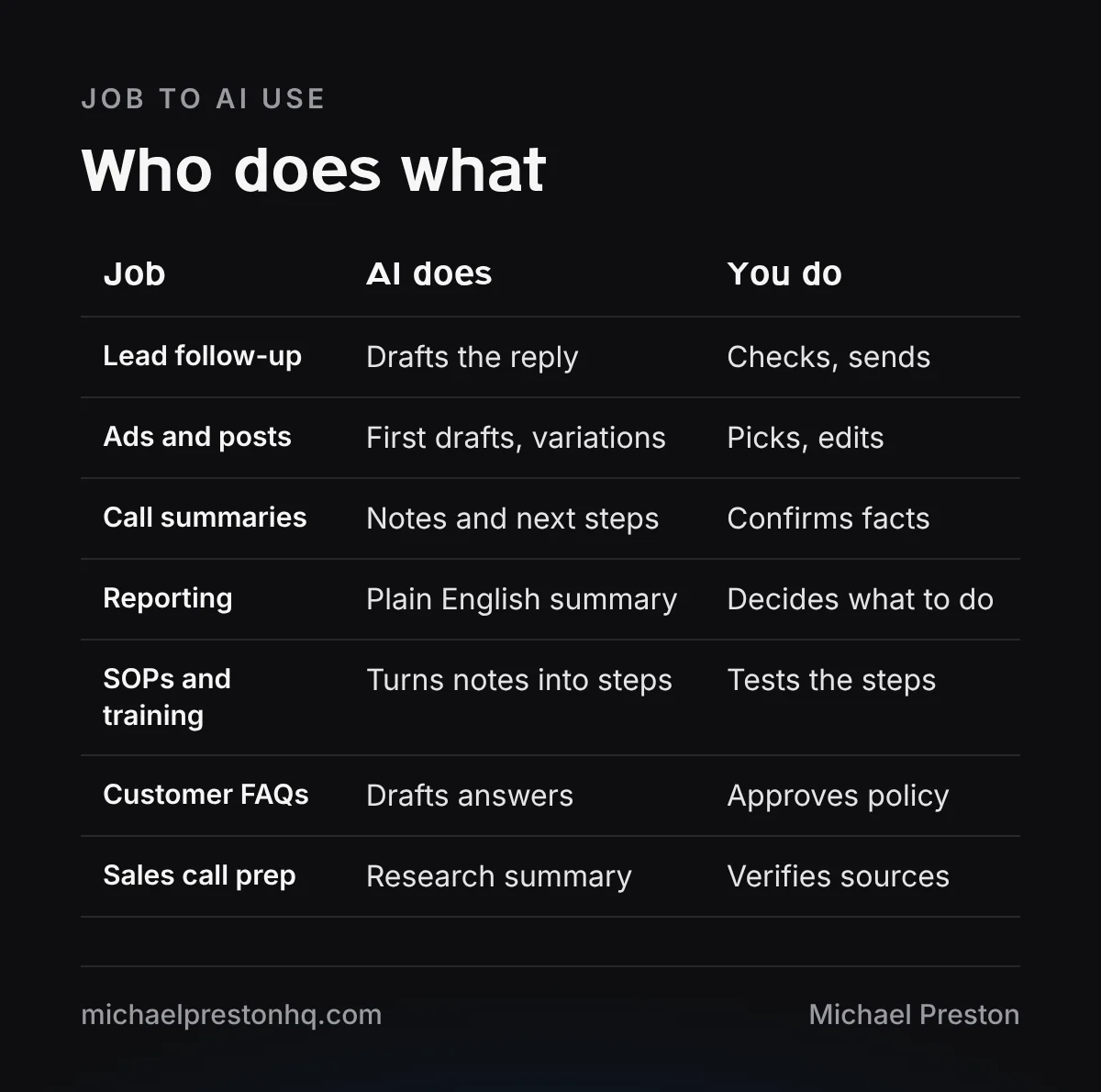
- Seven practical uses: follow-up drafts, ad and content drafts, call summaries, reporting, SOPs, customer FAQs and sales call prep.
- Keep a human on anything that goes to a customer, and keep private data out of tools you have not checked.
AI for small business works best on the jobs you put off: first drafts, summaries and admin. It does not run your business for you, but it can take the first pass off your plate. If your bigger problem is leads that never turn into jobs, the free funnel audit will show you where. For the software side, the tools page lists what I use day to day.
Find Out Where Your Marketing Is Losing Money
12 quick questions. The same 5-Point Funnel Audit I run before I start work on a client's ad account.
This post covers seven practical uses, what not to hand to AI yet, and a simple 30-day plan to get started. No tool rankings, just jobs.
Start with the job, not the tool
Most owners start by asking which AI tool is best. A better first question is: which task do I keep putting off? Pick that job first. Then pick whatever tool does it well enough.
Good first jobs have three things in common. You do them often, they start from a blank page, and a mistake is easy to catch before it matters. Writing a follow-up email fits. Filing your taxes does not.
7 practical uses
1. Lead follow-up drafts
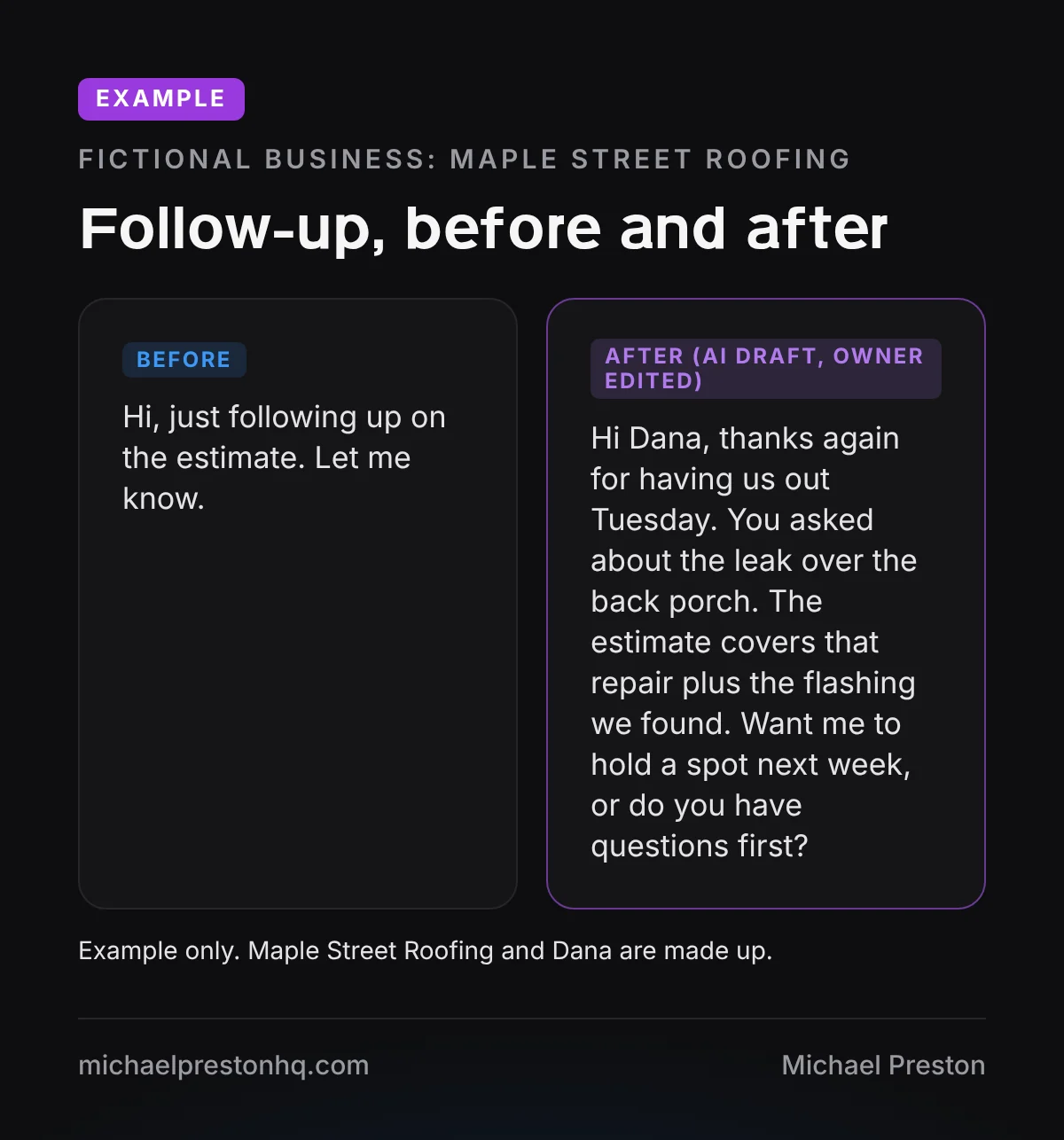
Slow follow-up loses jobs. Paste in the notes from an estimate or a call, and ask for a short, friendly follow-up in your voice. You edit it and send it. The draft takes seconds, and it is much easier to fix than to write from scratch.
2. Ad and content first drafts
Give AI your service, your customer and the main objection, and ask for five ad angles or a rough outline for a post. Most of it will be average. A couple of ideas will be worth working on. Treat it as a brainstorm partner, not a writer.
3. Call and meeting summaries
Many meeting and phone tools can now transcribe and summarize a call. Ask for the decisions, the next steps and who owns each one. Read it before you share it, because summaries can miss or invent details.
4. Reporting in plain English
Export your numbers from your ad account or CRM, remove anything private, and ask AI to explain what changed this month in plain language. It is a quick way to spot what needs a closer look. You still decide what to do about it.
5. SOPs and training docs
Record yourself explaining a task, or write rough bullet notes, and ask AI to turn it into numbered steps. Then have a team member follow the steps and mark what is unclear. This is one of the easiest wins, because most small businesses have no written process at all.
6. Customer FAQs
List the questions your team hears every week. Ask AI to draft short, clear answers. You approve anything about policy, timing or guarantees. Use the answers on your website, in emails and as a cheat sheet for whoever answers the phone.
7. Research before a sales call
Before a big estimate or meeting, ask AI to summarize what a company does and what it might care about, based on its public website. Check anything important against the source. It helps you walk in prepared instead of guessing.
How to write a prompt that works
Most bad AI output comes from vague requests. “Write a follow-up email” gets you something generic. A good prompt gives the tool the same context you would give a new employee.
- Who it is for. The customer, what they asked for and where things stand.
- What you want. A short email, a list of five ideas, a summary with next steps.
- Your voice. Paste in one or two messages you wrote that sound like you.
- The limits. Length, what to leave out, and anything it must not promise.
- What to check. Ask it to flag anything it is unsure about.
Once a prompt works, save it. A shared document with your best prompts, one per job, is one of the most useful things a small team can build. It also makes it easy for a new hire to get the same results on day one.
What not to hand to AI yet
- Sending messages without review. Anything that goes to a customer gets read by a person first.
- Quotes, contracts and legal wording. Use AI to draft questions, not final terms.
- Private data. Keep customer details, passwords and financial records out of any tool until you know how it stores data.
- Facts you cannot check. AI can sound sure and still be wrong. If you cannot verify it, do not publish it.
- Your judgment. Hiring, firing and big spending decisions stay with you.
A simple 30-day starting plan
You do not need a big rollout. One job, done well for a month, teaches you more than trying ten tools at once.
- Week 1: pick one job. Choose the task you put off most. Write one prompt and try it on real work.
- Week 2: use it daily. Run it every day. Keep a short log of what you had to fix.
- Week 3: make it a template. Save the prompt that works, and write the steps so someone else can run it.
- Week 4: keep, fix or drop. Look at your log. Keep what helped, fix what did not, then add a second job.
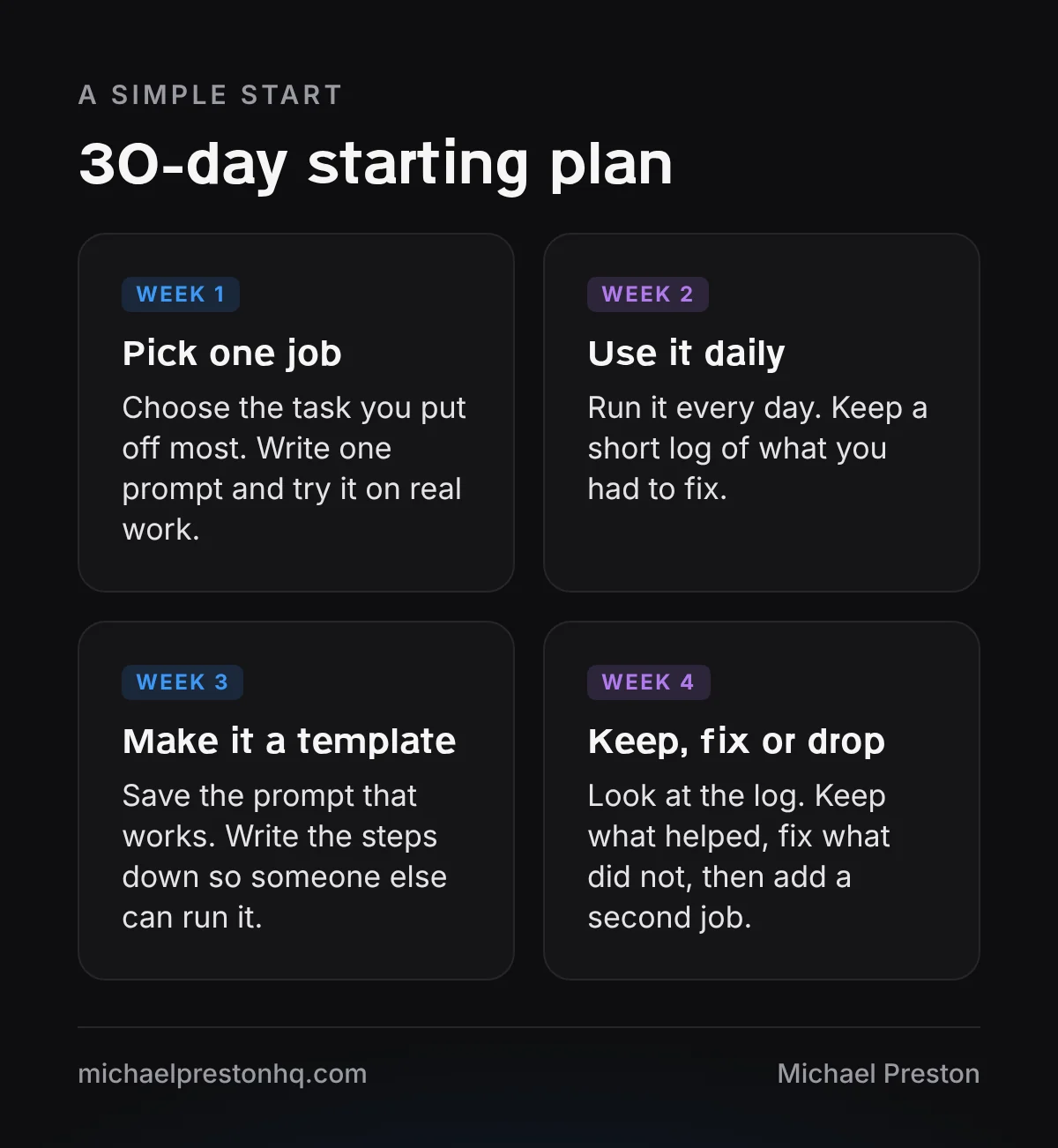
Maple Street Roofing (a made-up business) starts with estimate follow-ups. In week 1 the owner writes one prompt. By week 4 the office manager uses a saved template, and the owner adds call summaries as the second job.
How to tell if it is working
Keep it simple. For each job you hand to AI, ask three questions at the end of the month. Did it save time compared to doing it the old way? Did the quality stay the same or get better? Did anyone have to clean up a mistake?
If the answer to the first two is yes and the third is no, keep it and write it into your process. If it saves time but the quality drops, fix the prompt or add a review step. If nobody uses it, drop it and pick a different job. That is not a failure, it is the point of testing one job at a time.
Your log from week 2 helps here. A few notes like “had to rewrite the opening” or “missed the address” show you exactly what to fix in the prompt.
Keep a simple list of what you tested, what you kept and what you dropped. In a few months it becomes a clear record of how AI fits into your business, and it saves you from testing the same idea twice.
Bringing your team along
Tell your team what AI is for and what it is not for. Share the prompts that work so everyone is not starting over. Ask the person who does the task every day to help shape the template, since they know where it breaks.
Keep it boring and practical. The goal is fewer hours on blank pages, not a new system to manage.
If you want to see how this works inside a small agency, read how I run a marketing agency with AI. I also cover this in my AI for business owners talk. Questions about your own setup? Contact me.